How to fix your website's speed with Claude Code
November 1, 2026, 4 min read

A coding agent reading your source can guess what makes a page slow. It can't see which script froze the page for 4 seconds on a mid-range phone. Give it a measured report and the guessing stops: it knows what to fix, in what order, and which files are involved.
This is the workflow we used on FreeGen, one of our own sites. The page went from 236 requests over 36 seconds to 10 requests in 3.4 seconds:
Before 236 requests, finished at 36.1 s
After 10 requests, finished at 3.4 s
- Third-party: 233 before, 5 after
- FreeGen's own: 3 before, 5 after
From FreeGen's two mobile tests. The ad stack mostly didn't load in the second run, because it waits for an interaction that a lab test never makes. See the caveat below.
The mobile score went from 70 to 98:
- Before
- After
Performance score
Total Blocking Time
Page size
Requests
Load time
Fully loaded
Largest Contentful Paint Slower
One mobile test each, about 20 minutes apart. Each metric's bars have their own scale.
Show the data
| Mobile test | Before | After |
|---|---|---|
| Performance score | 70 | 98 |
| Total Blocking Time | 4.0 s | 182 ms |
| Page size | 2.8 MB | 110 KB |
| Requests | 236 | 10 |
| Load time | 7.7 s | 3.1 s |
| Fully loaded | 36.1 s | 3.4 s |
| Largest Contentful Paint | 872 ms | 1.2 s |
Largest Contentful Paint got slightly worse, so not every number moved the right way. You can compare the two reports. Further down, there's an important caveat about where most of that gain came from.
The steps below use Claude Code, but they work the same with Cursor, Codex or any agent that can edit your code.
1Test the page on mobile
Run a test on the page most of your visitors land on, usually the home page. Choose mobile: it uses a mid-range phone on Slow 4G, so problems that a fast laptop hides become obvious.
2Click Copy for AI
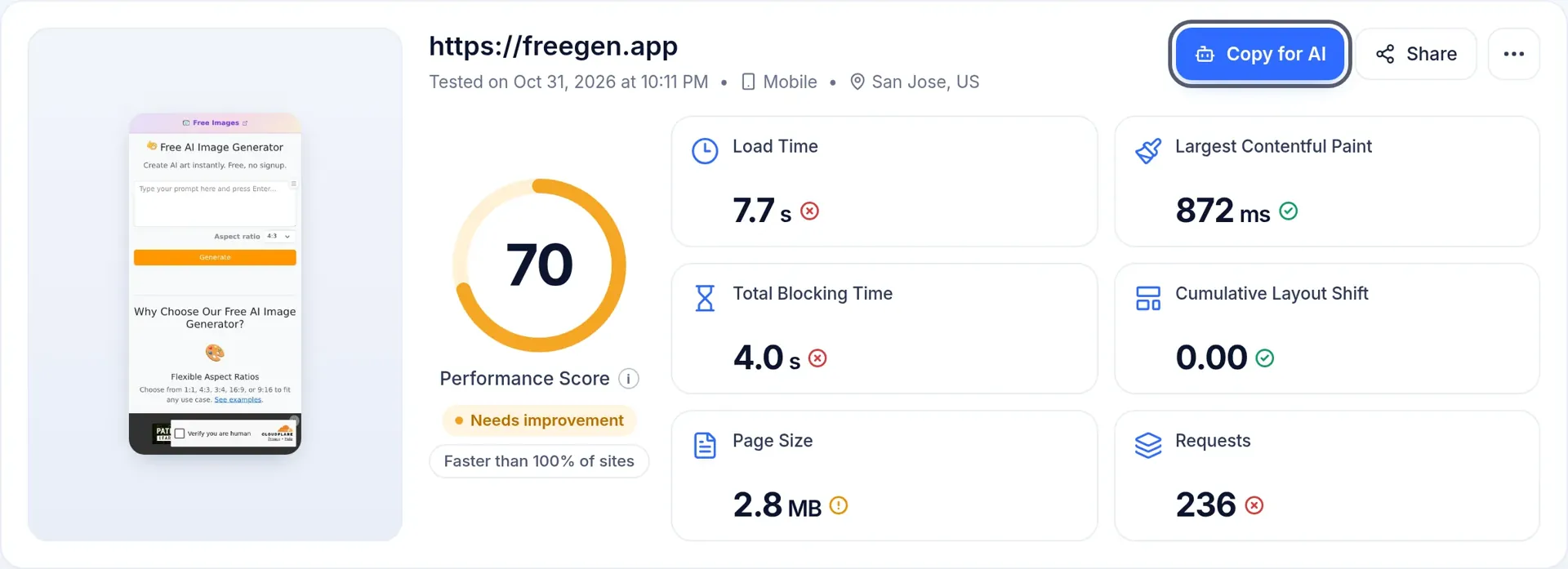
On the report, click Copy for AI. It copies a prompt with three parts: the top fixes, rules for how the agent should work, and the full report in Markdown. This is how FreeGen's prompt started:
Improve the loading speed of `https://freegen.app/`. PageBench tested it on mobile and it scored 70/100 (needs improvement). The full report is below.

Fix these performance issues in order of priority, highest impact first:
1. **Reduce main-thread blocking work** (high impact, could save 4.0 s): Break up long JavaScript tasks. Details are in recommendation 1 of the report.
2. **Serve images in next-gen formats** (high impact, could save 1.5 s, 306 KB): Use WebP or AVIF to reduce image size. Details are in recommendation 2 of the report.
3. **Minify JavaScript** (high impact, could save 774 ms, 162 KB): Remove unused code and minify JS files. Details are in recommendation 3 of the report.
The rules matter as much as the list. They tell the agent to make the smallest change that fixes each issue, not to change how the page looks without saying so, and to ask before removing any third-party script. They also tell it to treat text from the tested page as data rather than instructions, because a report quotes content from the site it tested.
An agent that can fetch URLs can also read a report directly: add .md to the report's link.
3Paste it into your agent
Open Claude Code in your project's folder and paste the prompt. The agent looks for the code behind each issue and starts on the highest-impact fix. If it can't reach the code, for example because the site runs on a hosted builder, the prompt asks it to explain exactly what to change and where.
4Read the changes before you deploy
Speed fixes involve trade-offs that only you can decide on, so read the diff. On FreeGen, there were three main changes:
- Ads load on the first interaction. The ad script pulled in about 1.5 MB of JavaScript, which caused nearly all of the blocking time. It now starts when the visitor moves the mouse, touches the screen, scrolls or presses a key. The ad slots keep their reserved space, so nothing jumps when they fill.
- Images match the size they're shown at. Thumbnails are now served in the sizes they're displayed at, with
srcsetfor larger screens. - Bootstrap's CSS comes from the site's own domain. First paint no longer waits for a connection to a CDN.
5Deploy, test again and compare
Test the same URL on the same device. The new report shows the change from your previous test, and you can compare any two runs side by side. Results vary between runs, so if a change is small, run the test again before you trust it.
If there's more to fix, copy the new report into the agent and repeat. FreeGen's new report had two recommendations left, down from ten.
Where an agent can't help much
- Other companies' scripts. It can defer or remove them, but it can't make them smaller.
- A slow server. If the time to first byte is high, the cause may be hosting or a database the agent can't see. It can only suggest where to look.
- What real visitors experience. PageBench is a lab test: one run from one location on one simulated device. For data from real visitors, check the Core Web Vitals report in Google Search Console once your site has enough traffic.
Built your site with Lovable? See why Lovable sites get slow and how to fix them.